
Ecommerce PPC Agency That Starts With Your Product Feed
Shopping ads read your product data, not your keywords. We fix the feed, set ROAS targets from your margins, and track the revenue each sale brings in.

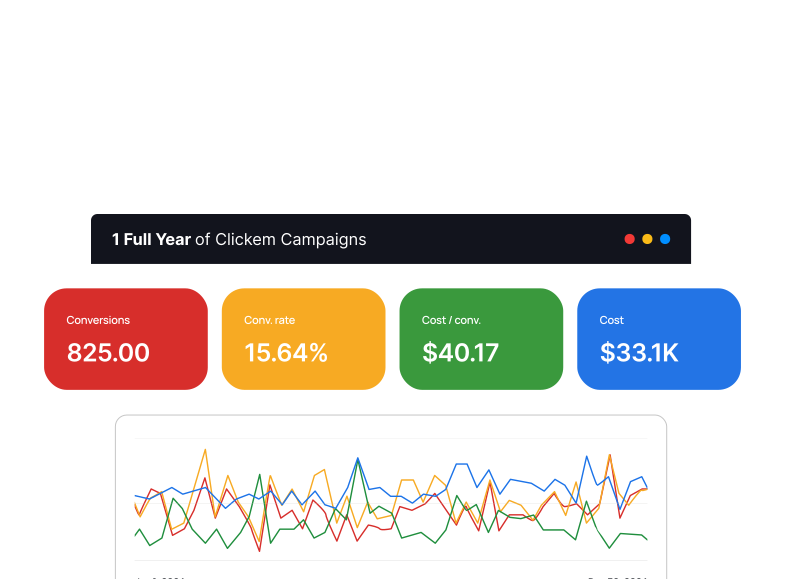
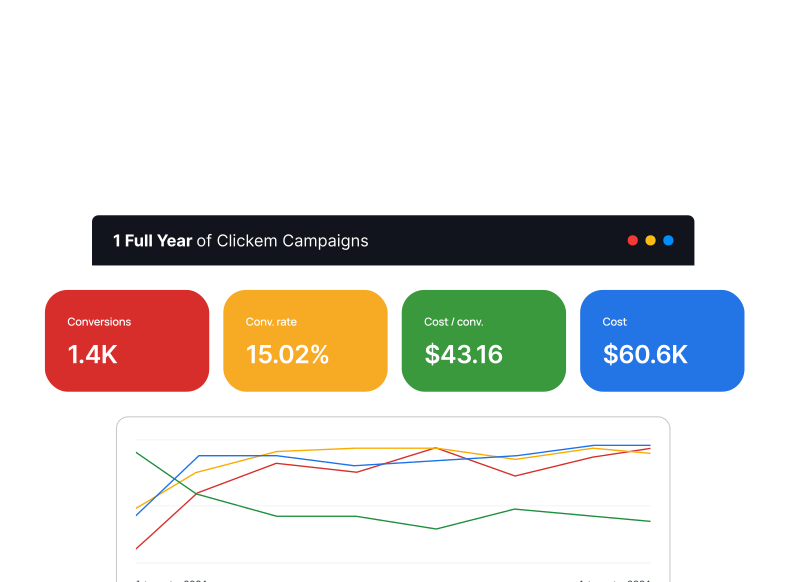
Same peak season, one year apart


Source: our Christmas ecommerce retailer case study. Same September to January window, year over year.
Your product titles decide which searches you win
Shopping ads and Performance Max do not run on keywords. They read your product feed. A title that is just a brand name and a part code will never match a shopper who types “black leather ankle boots.” So we start in Merchant Center. We clear disapproved products, fill in missing GTINs, and rewrite titles the way people search.
Search ads still matter, but we split them in two. Brand searches come from people who already know your store. Non-brand searches come from new shoppers. Kept apart, you can see what a new customer really costs. Our Google Shopping ads guide shows the feed fixes in detail.


One ROAS target for the whole store loses money
Most stores get one ROAS target for every product. That is a leak. Your break even ROAS is 1 divided by your margin. With a 40% margin, a 250% ROAS only breaks even. A high margin item and a thin margin item cannot share that number. Our break even ROAS guide shows how to work out yours.
So we sort your catalog by margin and priority. Top sellers with room to grow go into Performance Max, with their own budget. Products that need a closer eye go into Standard Shopping, where you can see each search. Products that lose money on every sale come out.
Our Services
One team for your feed, your campaigns, your tracking and your reports.
Shopping and Performance Max
• Merchant Center feed cleanup
• Disapproved product fixes
• Product titles written for search
• GTIN and attribute fixes
• Standard Shopping campaigns
• Performance Max asset groups
• Products split by margin
Search, Remarketing and Meta
• Brand Search campaigns
• Non-brand Search campaigns
• Remarketing to cart visitors
• Display and YouTube for shoppers
• Meta ads on Facebook and Instagram
• Negative keyword management

Tracking, Pages and Reports
• Purchase tracking with real value
• Enhanced conversions
• Landing pages built in Unbounce
• Heatmaps and A/B tests on pages
• Account audits
• Weekly and monthly revenue reports
We count sales and what each sale was worth
If your tracking counts page views, or counts orders with no value, Google chases the wrong thing. It will find you lots of small orders and call it a win. So we check that every purchase fires once, sends its real value, and is the only main goal. We add enhanced conversions where they help.
This was the first fix for a healthcare ecommerce brand. Its tracking counted page views, not purchases. Once real revenue flowed in, the account tracked $2.4M in revenue on $216K in spend. ROAS stayed above 1,000% for 21 months.
Your peak season is won before it starts
Many stores make a big share of their year in a few busy weeks. That is when a broken feed or a flat campaign costs the most. So we do the slow work early. We clear disapprovals, rewrite titles, and rebuild campaigns before the rush. That gives bidding time to settle.
A Christmas retailer started with us in September. We rebuilt both Performance Max and Standard Shopping so budget followed product priority and margin. We cut low return products and added 500+ negative keywords. Spend went up 110%, and ROAS still rose. Our Performance Max guide explains the parts you can control.
Not sure if your feed is the problem?
Give us view access. We will check Merchant Center for disapprovals, test how purchase value is tracked, and tell you which fix should pay off first.
How we run a store's account
Three habits that keep your ad spend tied to profit, not just to sales.

We ask for your margins on the first call
A ROAS target means nothing until we know what each product group earns after cost of goods. So margin is one of the first things we ask for. Every target we set sits above your break even point.

Your feed gets regular checks
Products get disapproved, prices change, and stock runs out. Any of these can pull a best seller out of your ads without warning. We check Merchant Center each week, so problems get fixed before they cost you a sales day.

Reports that split brand from new shoppers
Sales from people who searched your store name would often happen anyway. So your weekly and monthly reports show brand and non-brand results apart. You see what it really costs to win a shopper who did not know you yet.
Questions store owners ask before hiring us
How much does it cost to have you run our store's ads?
We quote after we look at your account, because catalog size and ad spend change the work. Ask every agency, us included, how the fee is set. A fee that is only a cut of ad spend pays the agency more when you spend more, even if your return drops. Our Google Ads management pricing post compares the usual models.
What store data do you need from us on day one?
We need access to Google Ads, Merchant Center and Google Analytics, plus your margin by product group. We also want your sale calendar, your best sellers, and any products you plan to push or drop. Margin is the big one. Without it, any ROAS target is a guess. Our ecommerce advertising page shows the full setup.
How soon will sales move after you take over?
You will see early signs fast, because store sales show up the same day. Fixing disapproved products can bring them back into your ads quickly. Bidding needs a few weeks to settle after a rebuild. Judge us over a full quarter, and judge us on revenue and ROAS by product group, not on clicks.
Is it too late to hire you right before Black Friday?
It is not too late, but the plan changes. A big rebuild right before a peak puts your best weeks at risk while bidding relearns. So close to the rush, we fix tracking and clear disapprovals first, then add negative keywords. The full rebuild by margin and priority waits until the peak is over. Ideally, start a few months ahead.
If we stop working together, do we keep the feed and the data?
You should. Your Google Ads account, Merchant Center account, feed and history belong in your name, with your agency added as a user you can remove. Get that in writing from any agency, us included. The titles and feed fixes we make stay with your store. You should never have to start over because you changed agencies.
Free guides for store owners
These guides go deeper on the work above, and the first one is worth reading before you talk to any agency.
- questions to ask before you hire anyone, so you can spot a generalist fast
- how to structure an ecommerce ad account, from campaigns to budgets
- what ROAS means and how to read it, with simple math
- how to set up purchase conversion tracking, so every sale counts once
- our Google Ads management service: Search next to Shopping
Our Technologies
We have expertise across leading platforms.

Find out what your store's ads really earn
Tell us your margins and your busy season. We will show you where the feed, the tracking or the campaign split is costing you, and what we would fix first.



